
See what is open
Live visual previews are faster to recognize than a row of tiny icons or repeated Alt-Tab cycles.
WindowCue is a persistent Windows sidebar that turns the windows you already have open into visual previews you can recognize and jump back to with one click.
A deliberately overbuilt Hello World project makes the point: editor, preview, terminal, design files, docs, and project folders can all stay open while WindowCue keeps the important windows visible at the edge of the screen.
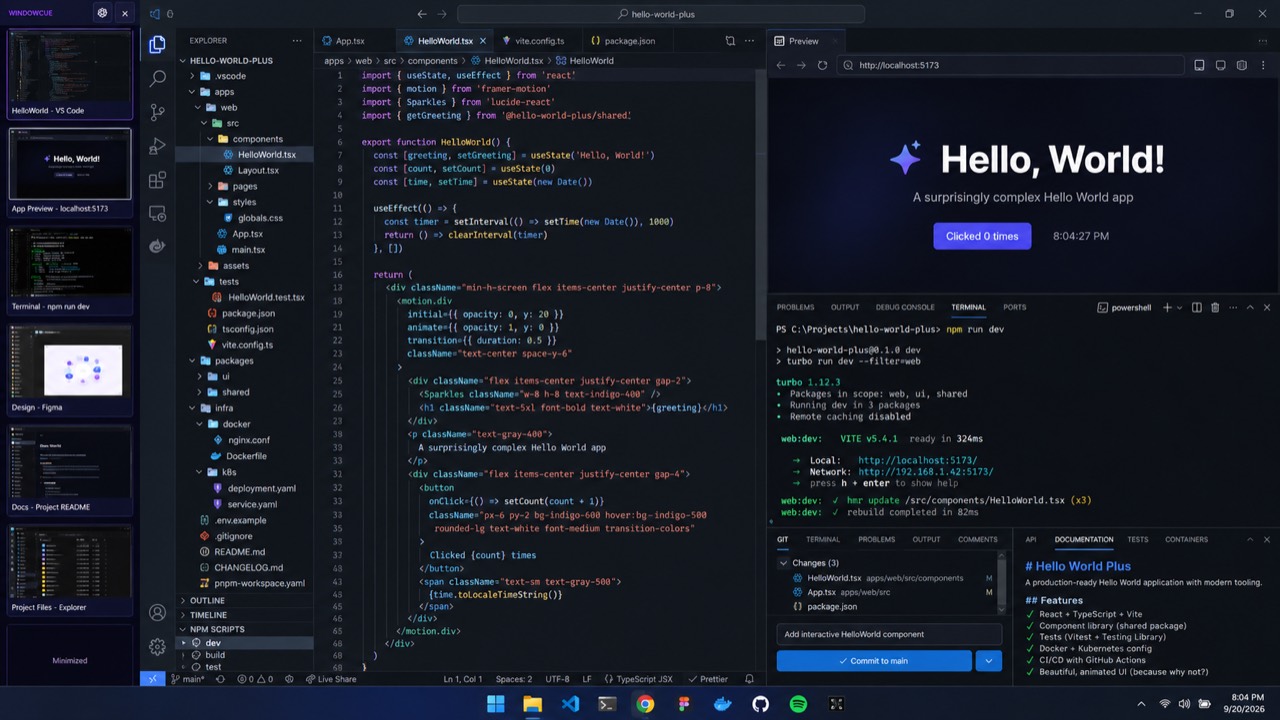
The big screenshot establishes the problem. From there, the focus gets tighter: what is open, what matters, and how quickly you can get back to it.
Live visual previews are faster to recognize than a row of tiny icons or repeated Alt-Tab cycles.
Click a tile to restore and activate that window. Minimized windows stay easy to find instead of disappearing into the taskbar.
Overlay and reserved-space modes let WindowCue sit beside your work without trying to become a full tiling window manager.
The screenshot shows the three things WindowCue is designed to make easier: recognizing what is open, keeping a visual map of the workspace, and returning to a minimized window.
The upper sidebar keeps the header and the first open-window previews visible together.
Keep the rest of your windows in view, with a visible route back even when an app is minimized.
For people who somehow turned Hello World into a seven-window project.
WindowCue · Tales N Tools